Thursday, 29 May 2014

Wordpress: How to Change WordPress Themes Directly From the Database

How to Change WordPress Themes Directly From the Database

Sometimes it becomes necessary to manually change your theme directly from the database instead of via the WordPress admin. This is actually what we use when upgrading our admin demos since it’s much faster using the command prompt or phpMyAdmin.

Prerequisites

  1. Comfortable with either phpMyAdmin or command prompt to run SQL statements
  2. Some understanding of WordPress option values

Getting Started

There are three option_name rows in the database that need to be changed. These are what control which theme is currently active on your website.
  • template – the “Theme Name” as defined in style.css
  • stylesheet – the actual name of your theme folder
  • current_theme -the actual name of your theme folder

Step 1

First let’s do a quick check and see what theme you currently have set. Note, this SQL assumes you have your tables named with the standard wp_ prefix. If that is not the case, you’ll need to changewp_options to whatever prefix your table structure uses.
SELECT *
FROM wp_options
WHERE option_name = 'template'
OR option_name = 'stylesheet'
OR option_name = 'current_theme';
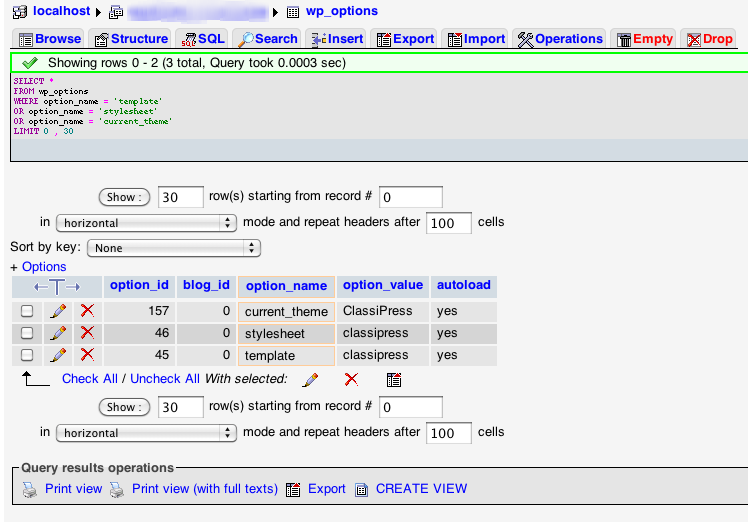
After running the SQL from within phpMyAdmin, you should see something like this:
wordpress-change-theme-database
Results after selecting the three option rows.

Step 2

Now it’s time to change the theme. Figure out which one you’d like to switch to and change the threeoption_values = ''  below. You’ll notice that the first option is capitalized which is important.
Once you’ve got your SQL code you’ll run it to change your current theme. (this example assumes you have ClassiPress already in /wp-content/themes/classipress/.
UPDATE wp_options SET option_value = 'ClassiPress' WHERE option_name = 'template';
UPDATE wp_options SET option_value = 'classipress' WHERE option_name = 'stylesheet';
UPDATE wp_options SET option_value = 'classipress' WHERE option_name = 'current_theme';
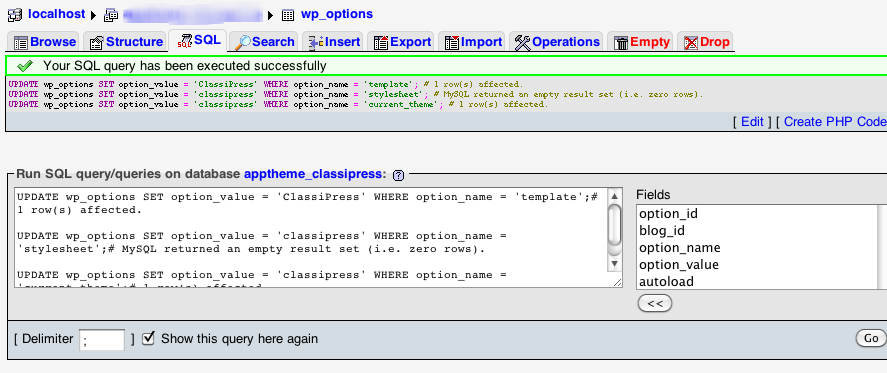
After running that SQL from within phpMyAdmin, you should see a success message similar to this:
wordpress-change-theme-database-done
If your SQL statements were correctly run, you'll see a message like this:

Step 3

Go back to your website and refresh. You should now see the new theme running.

Having Trouble?

If you get an error 500 page or a different error, it’s likely you didn’t use the correct values for the theme. Go back and make sure they are correct.
One common error occurs when you’ve got the same theme but with different folder names (i.e. classipress-31 and classipress-312). In this situation the “Theme Name” in style.css is the exact same so your “template” option_name should be “ClassiPress/classipress-312″ instead of just “ClassiPress”.
If it’s still showing the old theme, clear your cache (if you use a caching plugin like WP Super Cache) and that should resolve it.

Get Out of Jail Free Card

If you’re in a bind and can’t get anything to work, just run this SQL from phpMyAdmin. It will reset your website to use the default Twenty Eleven theme (change your wp_ prefix if necessary).
UPDATE wp_options SET option_value = 'Twenty Eleven' WHERE option_name = 'template';
UPDATE wp_options SET option_value = 'twentyeleven' WHERE option_name = 'stylesheet';
UPDATE wp_options SET option_value = 'twentyeleven' WHERE option_name = 'current_theme';
Like this tutorial? Subscribe and get the latest tutorials delivered straight to your inbox or feed reader.
1 2 3 4 5 Your rating: none
Rating: 4.9 - 16 votes

Child-Theme: After activating child theme cannot see anything

In the child theme folder after I copied Functions.php, child theme was not showing anything. So I logged in the hosting-->File Manager-->Then deleted the functions.php file.

See post to manually change the theme from the database

Friday, 23 May 2014

Child-Theme: Child theme css not reflecting the display/not overriding parent theme

Use !important to check if it is working or not.
Check order of the stylesheet loading in the header.

Emphasize the selector class name or id by adding something, for example: if you want the change the body background do not just put "body{background: url("body-background1.jpg");}" add a word to the body selector. Declare the class name like this "head + body{background: url("body-background1.jpg");}". I do not know the reason why but it works.

I'm using the well-written Oenology theme by Chip Bennett as the Parent to my own Child theme.
In my development process, I've discovered that there are some challenges for people writing Child themes when it comes to controlling styles.
I've just discovered that my main style.css file gets loaded before every other stylesheet link or statement in <head>, and this explains why I was having trouble overriding some of the Parent styles.
further study of the problem shows that various Parent stylesheets and styles can be queued in the <head> in three places; add_action('wp_print_styles',add_action('wp_enqueue_scripts',, and then add_action('wp_head',.
to keep things simple, I'm planning to create two stylesheets. the first main 'style.css' sheet would only include the @import url() command, needed to load Oenology's main stylesheet.
the second stylesheet would contain my Child rules. to make sure that it's loaded after all of the other rules, I'd queue it using add_action( 'wp_head',.
does this sound reasonable? or is there a better (more correct) way to do it?
btw, does anyone know what '/parent-theme/style.css?MRPreviewRefresh=723' means?

Update

wp_enqueue_style() doesn't appear to work in wp_head().
cheers,
Gregory
shareimprove this question
add comment

3 Answers

Just FYI, this question probably borders on too localized, as it is specific to the Oenology Theme.
That said, here's where I think you're having a problem: Oenology enqueues two style sheets:
  1. style.css, directly in the document head (thus before wp_head() is fired)
  2. {varietal}.css, at wp_enqueue_scripts, with priority 11, in functions/dynamic-css.php:
    /**
     * Enqueue Varietal Stylesheet
     */
    function oenology_enqueue_varietal_style() {
    
    // define varietal stylesheet
    global $oenology_options;
    $oenology_options = oenology_get_options();
    $varietal_handle = 'oenology_' . $oenology_options['varietal'] . '_stylesheet';
    $varietal_stylesheet = get_template_directory_uri() . '/varietals/' . $oenology_options['varietal'] . '.css';
    
    wp_enqueue_style( $varietal_handle, $varietal_stylesheet );
    }
    // Enqueue Varietal Stylesheet at wp_print_styles
    add_action('wp_enqueue_scripts', 'oenology_enqueue_varietal_style', 11 );
The varietal stylesheet, which applies the "skin", enqueues at priority 11, to ensure that the base stylesheet, style.css, loads first, and the varietal stylesheet loads second, in order to cause the correct cascade.
So, if you need to override the varietal stylesheet, simply enqueue your second stylesheet afterthe varietal stylesheet; i.e. with a priority of at least 12 or greater.

Edit

To provide a more-general answer, to the more-general question:
In order to override a Parent Theme stylesheet enqueue, you need to know two things:
  1. The action hook at which the stylesheet is enqueued
  2. The priority at which the callback is added to the hook
Enqueue functions (wp_enqueue_script()/wp_enqueue_style()) can be properly executed anywhere between the init hook and the wp_print_scripts/wp_print_styles hooks. (Thesemantically correct hook at which to execute wp_enqueue_*() functions is currently wp_enqueue_scripts.) This list includes the following actions (among others; these are just the usual suspects):
  • init
  • wp_head
  • wp_enqueue_scripts
  • wp_print_scripts/wp_print_styles
(Note that wp_enqueue_scriptswp_print_styles, and wp_print_scripts all fire inside of wp_head, at a specific priority.
So, in order to override a Parent-Theme stylesheet, you need to do one of the following:
  • De-enqueue the Parent-Theme stylesheet, via wp_dequeue_style( $handle )
  • Remove the Parent Theme callback that enqueues the style, via remove_action( $hook, $callback )
  • Use the CSS cascade to override the Parent-Theme stylesheet, by hooking your Child-Theme stylesheet wp_enqueue_style() call into the same hook with a lower priority or into a later hook.
    For this last option, if the Parent Theme uses:
    `add_action( 'wp_enqueue_scripts', 'parent_theme_enqueue_style', $priority )`
    ...then the Child Theme would use:
    `add_action( 'wp_enqueue_scripts', 'child_theme_enqueue_style', {$priority + 1} )`
shareimprove this answer
   
thank you Chip. I can indeed use wp_enqueue_scripts and a high ordinal to get my Child stylesheet to load last. there are however still 3 different style statements after my Child stylesheet statement. 2 of them are output by WP itself!!!, and 1 is output by Oenology via wp's add_custom_image_header() function. –  Gregory May 10 '12 at 2:38
   
the body.custom-background style statement is output by WP itself, but it appears that I can specify a custom background color by defining 'BACKGROUND_COLOR'. strange that a basic css rule would need to be set via a custom WP constant. –  Gregory May 10 '12 at 2:47
1 
last comment Chip. this question is not too localised. many themes would use all of the available hooks to enqueue or print styles, and Child theme developers need to know how to override those styles without necessarily disabling them. cheers. –  Gregory May 10 '12 at 2:49
add comment
You should always use wp_enqueue_style() to load your stylesheet and that functions should be hooked to the wp_enqueue_scripts hook with runs in the head. I suspect that you weren't hooking it there, hence your problem. (As of WP 3.3, if wp_enqueue_style() is hooked to anything else, it throws a Notice with WP_Debug turned on).
shareimprove this answer
   
@Chip's answer is better than mine and he's arguably more-qualified to discuss the Oenology theme ;) Is this a case where I should delete my answer even though it's right-ish? –  mrwweb May 9 '12 at 16:45
   
No, I would leave your answer. It is correct, and addresses a specific part of the question. – Chip Bennett May 9 '12 at 16:54
add comment
the only way to guarantee that my styles had final say in the cascade was to include them at the end of <head> via the wp_head hook. wp_enqueue doesn't work within wp_head so I had to echo the link directly:
function gregory_enqueue_stylesheets() {
    $base = get_stylesheet_directory_uri();
    echo '<link rel="stylesheet" href="'.$base.'/style-gregory.css" type="text/css" media="all">';
    return;
}
add_action( 'wp_head', 'gregory_enqueue_stylesheets', 18 );
finally, I can set my styles with relative ease, and without using high levels of specificity, or the !important rule which should only be used as a last resort.
WP needs a better style enqueuing system. every style, whether a file link or an inline style, should be passed through the same hook allowing the Priority to determine their order. optionally for debugging purposes, it would be useful if the hook also output the Priority values of each style perhaps in commented form.

Update

I have been able to retain control of the styles in my Child theme while maintaining the original cascade of the Parent theme (which uses a main stylesheet, a sub-stylesheet, and a few style statements) by splitting my stylesheet into two as explained in the question. I am no longer using the wp_head() hook, instead using the proper and standard wp_enqueue_scripts() hook with a high ordinal to ensure that my stylesheet gets loaded last.
my Child theme's default stylesheet:
/*
Theme Name: Oenology-Gregory
Template: oenology
Version: 20120506-0026
*/

@import url("/wp-content/themes/oenology/style.css");
the function to enqueue my main stylesheet:
function gregory_enqueue_stylesheets() {
    $base = get_stylesheet_directory_uri();
    wp_enqueue_style( 'style-gregory', $base.'/style-gregory.css' );
    return;
}
add_action( 'wp_enqueue_scripts', 'gregory_enqueue_stylesheets', 18 );
there are however a few WP-generated style statements (i.e., not the parent theme) that are stated after my stylesheet, and I'll have to look at using either high specificity css rules to override the rules that concern me, or look for hooks to disable them, in particular the body.custom-background rule.
thank you all for your comments.
cheers,
Gregory